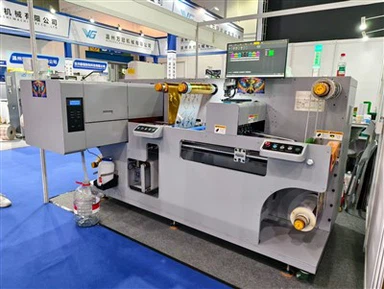
How digital printing presses work
Oct 24, 2024

Digital printing presses are an advanced printing technology that transfers color or colorants (such as ink) directly to the substrate by directly controlling the printing process through electronic data. Here is an overview of how digital printing presses work:
1. File preparation
- The process of digital printing begins with the creation of a digital file. This can be a document, a picture, or a design created using various software applications such as Adobe Photoshop for images or Microsoft Word for text documents. The file needs to be in a format that is compatible with digital printers, usually PDF (Portable Document Format) or a high-resolution image format such as TIFF (Tagged Image File Format).
- After the file is created, its color accuracy, resolution, and size may need to be adjusted. Color management is essential in digital printing to ensure that the colors of the printed output are as close as possible to the colors in the original file. This usually involves using color profiles that are specific to the printer and the type of paper or substrate used.
2. Printer settings
- Different types of digital printers are suitable for various printing tasks. For example, there are inkjet printers and laser printers. Inkjet printers work by spraying tiny droplets of ink onto paper, while laser printers use laser beams to transfer toner to the substrate.
- The printer is loaded with the appropriate paper or substrate. This can range from regular office paper to specialty papers such as photo-quality paper, cardstock, or even fabric in digital textile printing. The printer settings are adjusted based on the type of file being printed and the characteristics of the paper. For example, if printing a high-resolution photo, the printer might be set to a higher dpi (dots per inch) for better clarity.
3. The Printing Process
- Once the file is prepared and the printer is set up, the printing process begins. In an inkjet printer, a printhead moves across the paper, depositing a precise pattern of ink drops as dictated by the digital file. The ink drops combine to form text, images, or graphics. In a laser printer, a laser beam creates an electrostatic image on a drum, which then attracts toner particles. The toner is transferred to the paper and fused by heat and pressure.
- Printing speeds depend on the complexity of the file, the printer's capabilities, and the quality settings. A high-quality print with detailed images and fine text may take longer than a simple document containing only plain text.
4. Post-processing
- Once printing is complete, additional post-processing steps may be required, depending on the end use of the printed product. For printed materials like brochures or booklets, this may include folding, stapling or binding. For large format prints, such as posters, trimming may be required to remove any excess white space.
- Some digital prints also require coatings for added protection or to enhance the appearance. This may be a varnish or laminate coating, especially for items that may be frequently handled or exposed to the elements.